Power
Power planning is central to WILD experiments because battery selection, microSD choice, recording mode, selected preview signals, stimulation, and camera use all affect runtime.
Power Architecture
The WILD device conditions the selected battery through a converter and regulator chain before powering analog acquisition, digital control, and peripheral subsystems. Battery choice should therefore follow validated hardware-revision guidance rather than a single nominal-voltage number.
Boot, microSD writes, camera use, stimulation, and live preview can create different peak-load conditions. Validate the complete experiment mode on the bench before using a battery in an animal session.
Measured Device Modes
Representative WILD power modes are summarized here because they directly affect battery selection and runtime planning. Report these values together with the release image, SD-card model, battery, and enabled peripherals used for the session.
| Power (mW) | Channels | Samples/s | Mode | Weight (g) | Video | Audio | Motion sensor | Processing |
|---|---|---|---|---|---|---|---|---|
| 0.11 | 0 | 0 | Sleep | 1.48 | - | - | - | - |
| 24.42 | 8 | 4.0e4 | Ephys, IMU | 1.48 | - | - | Accelerometer, gyroscope, magnetosensor | Spectral power, TinyML |
| 194.04 | 64 | 2.6e6 | Ephys, IMU | 1.48 | - | - | Accelerometer, gyroscope, magnetosensor | Spectral power, TinyML |
| 208.67 | 64 | 2.92e6 | Ephys, IMU, audio | 1.48 | - | 160 kHz ultrasonic audio path | Accelerometer, gyroscope, magnetosensor | Spectral power, TinyML |
| 245.28 | 64 | 5.48e6 | Ephys, IMU, audio, video | 1.48 | 320 x 320 px, 16 Hz | 160 kHz ultrasonic audio path | Accelerometer, gyroscope, magnetosensor | Spectral power, TinyML |
The table is a planning reference, not a substitute for bench validation. Current draw can change with release image, recording duration, SD-card behavior, battery voltage, preview state, stimulation, and camera configuration.
Battery
The WILD device should use a battery approved for the specific hardware revision and experiment mode. Before mounting the device, confirm that the battery can boot the device without voltage sag, start recording, and sustain the planned sensors, preview state, stimulation, or camera load.
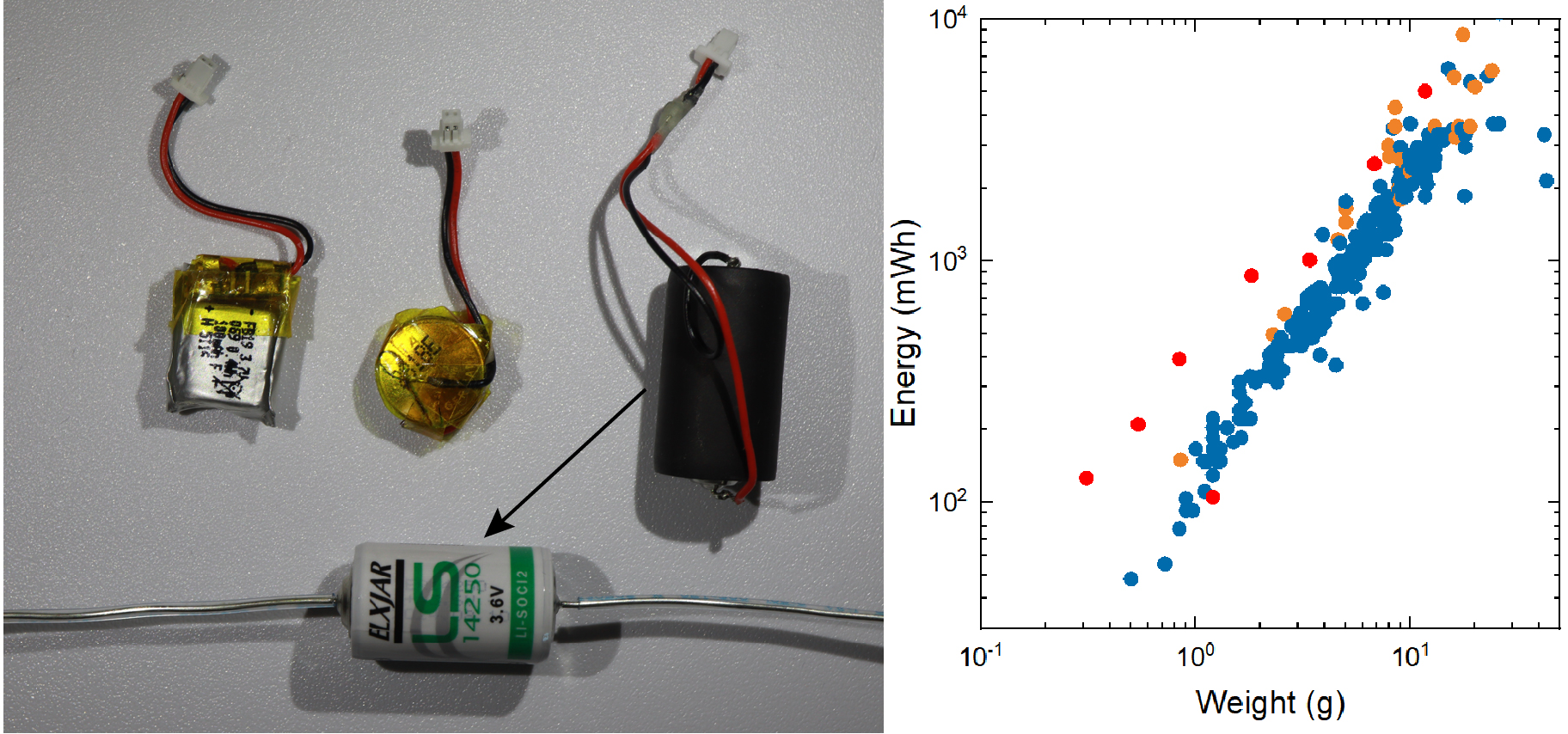
The battery selection table provides baseline capacity and runtime-planning references.
Battery Connector
The WILD device battery input uses the JST-SH connector orientation documented in the hardware setup workflow. The connector is part of the experiment record because polarity, strain relief, and repeated mating can affect boot stability and long-session reliability.
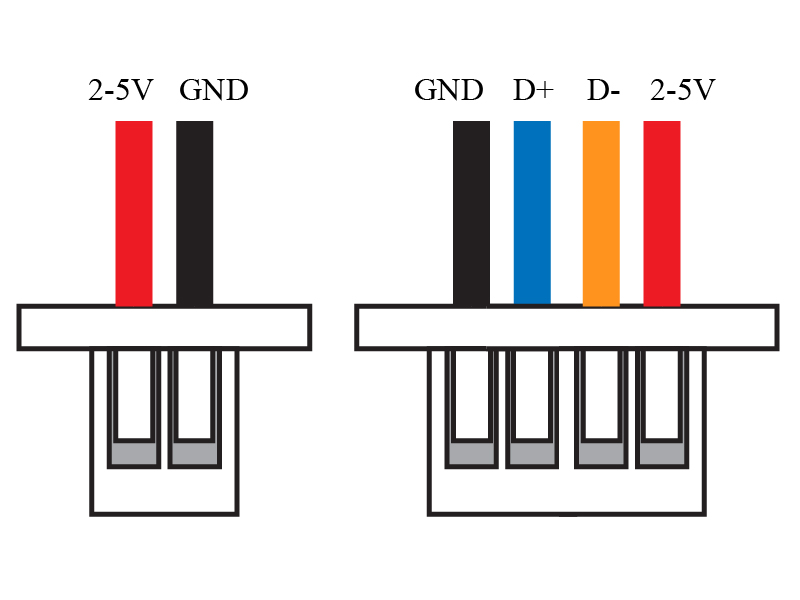
For each hardware revision, record:
- Battery connector type and orientation.
- Battery lead polarity as assembled.
- Whether the battery lead was modified, extended, or re-terminated.
- Any strain-relief method used between the battery, enclosure, and animal-mounted device.
Before a recording session, inspect the connector shell, solder joints, and battery lead for looseness or damage. Do not infer polarity from wire color alone; confirm the assembled connector orientation against the WILD hardware revision being used.
See Hardware Setup for the first-device connector checklist.
First Power Check
For a newly assembled WILD device, use the USB-to-4-pin bench cable and a USB power meter before connecting a battery. The first connection should draw less than 10 mA before a release image is installed; a higher or unstable current is a stop condition for solder-bridge and connector inspection.
The DFU mode-select pin can be temporarily shorted to VCC during USB connection to expose the STM32-DFU device for first image installation. Use the connector schematic, keep the short temporary, and verify the pin orientation before applying power.
Battery Charger
The charger is external to the WILD recording path. Charge batteries with a single-cell lithium-polymer charger that matches the battery chemistry, capacity, connector, and manufacturer charge-current rating. Record the charger model when reporting runtime or power stability results.
The WILD device should not be treated as a battery charger unless a specific hardware revision and release note explicitly documents charging support. For the public workflow, charge and inspect the battery before connecting it to the WILD device.
Recommended charger record:
| Item | Record |
|---|---|
| Charger model | Identifies the charge circuit used before the session. |
| Battery model and capacity | Links runtime to the actual energy source. |
| Charge current | Helps interpret battery heating, aging, and boot margin. |
| Connector adapter | Documents any JST-SH adapter or lead conversion used between the charger and battery. |
| Pre-session check | Confirms battery voltage, connector condition, and absence of swelling or cable damage. |
microSD Power
The microSD card is part of the power and reliability budget. Format cards with WILD Console before recording, and validate the selected card in the same sampling and modality mode planned for the experiment.
Runtime Reporting
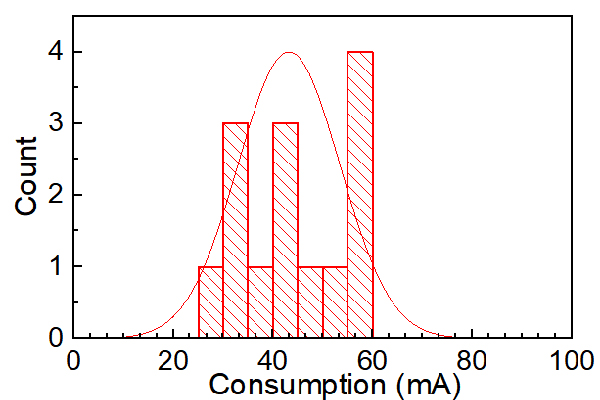
Runtime depends on sampling rate, active modalities, preview state, stimulation use, microSD-card model, battery capacity, and ambient conditions. When reporting a WILD recording mode, include:
- Release image.
- SD-card model and format state.
- Battery model and capacity.
- Sampling rate and enabled modalities.
- Preview state.
- Stimulation or TinyML state, if used.
- Session environment, especially for outdoor or long-duration recordings.